126 — SprinterUp
User Manual
Introduction / Definitions
Land and construction surveyors use many different types of survey markers to mark survey control stations, setout points or property boundaries. Different types of marks that surveyors use include wooden stakes and pegs, iron pins and pipes, a variety of nails and spikes, brass plaques, reflective retro sticker, spray paint and marker pen. → surveyorinsider.com
Survey Monument is a marker referencing a point on the land which is permanently tagged with the certificate number of the surveyor setting it. Monuments include a land boundary survey corner defined as a point on the boundary of any lot, tract, or parcel of real property; a controlling point for a plat; or a point which has been designated as permanent by state law or city ordinance. → codepublishing.com/WA/OakHarbor
Projects Directory
The list of all projects registered with the application. Under some conditions, only active projects will be listed and if only 1 project is active the App could go directly to the project.
The Jobs Directory
After selecting a project in the project directory, you can choose to list the Sprinter files uploaded. A Sprinter file is called JOB. It could contains the measures done during a day, or several days. Most of the time, those jobs will contain a loop, but could have multiple loops and even part of loop.
The Loop Page.
Loop Page contains the list of measures done for a project. Each measure has colors associated with its quality. Measures are grouped into loops. So a project can contain 1 loop or multiple loops. Each loop ends with a report.
Raw-Data from Sprinter
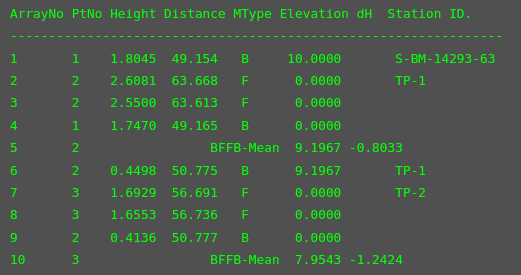
- a cycle is a group of 5 lines - here 2 groups. Ex: 6-7-8-9-10.
- the sequence in the cycle is BFFB (Backward - Forward - Forward - Backward)
- the 5th line is the elevation and dh.
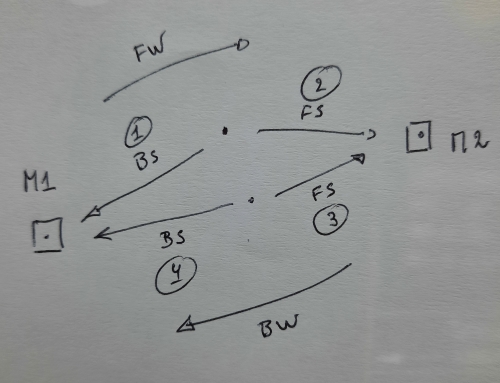
- line #1 : FW B1 (backsight toward station 1) FW: forward
- line #2 : FW F2 (forsight toward station 2) FW: forward
- line #3 : BW F2 (forsight toward station 2) BW: backward
- line #4 : BW B1 (backsight toward station 1) BW: backward
- lines #1, #2 are for forward loop (FW)
- lines #3, #4 are for backward loop (BW)
- line #5 gives elevation at station #2
- line #5 gives dh = ht@2 - ht@1 (is it on FW, BW or mean ?)
- elevation is irrelevant except for first and last line of a cycle (#1, #5)
Labeling control-stations
todo.
Case Study: off-road
Before uploading a new dataset (xlsx file), SprinterUp operates a few validations. One of them is to detect incorrect measurements, i.e: measures (BFFB) that the surveyors believe to be incorrect and need to be repeated.
Sprinter device has no easy way to mark a measure as incorrect or invalid. Instead the surveyor will put a mark on the exported file, to signal those accidents. This is a major source of mistakes during the loop processing.
To solve this, SprinterUp puts a warning on a sequence of measures (two or more consecutive) having the same 'distance' (with plus minus 10cm), and suggest that only the last on those measure is correct.
That worked fairly well until we encounter the so called "off-road" situation. An example would be when the surveyor must quit temporary the normal path on the road to set a control station "abeam".
abeam (definition) : at a right angle to the centerline — being at a bearing approximately 90 or 270 degrees relative — 3 O'Clock, 9 O'Clock
Inserting control-stations
Case study: A team did start a project (or a loop) on a wrong control station, i.e: a station with no known elevation (not a fix point), lets call it Loop-01. The team will revisit the site and make another loop (Loop-K) from the correct control station ending to the first station of the initial loop.
How to insert Loop-K in front of Loop–01 ?
Before importing an xls file - a new dataset - SprinterUp will operate an additional check to verify that the first station and the last station of the new dataset are already in the project dataset.
(1) If the first station is the last station of the project, then the new dataset is added at the end of the project dataset.
(2) If the last station is the first station of the project, then the new dataset is inserted in front of the project dataset.
(3) If both, first and last station are found in the project, then the new dataset will be inserted inside the project. Note that if there are stations between first and last in the actual project, a warning will be issued, and if accepted those stations will be deleted (marked inactive).
(4) in all other cases, SprinterUp will issue an error, and will not upload the new dataset.
Skipping Welcome page
The welcome page is displayed when visiting the root URL: https://sprinter-up or http://localhost:3000. By checking "do not display" this welcome page will be skipped at the next visit, and the visitor will see the page showing the projects list.
New Project
TODO list
- top menu: highlight the current state/page
- project folder
2022/289-sprinter-up